
會員登錄

軟體搜尋

您的位置: 網站首頁 >> 程式軟體光碟 >> 系統工具 >> 商品詳情
商品詳情
|
商品編號:CB18831 碟片數量:1片 銷售價格:200 瀏覽次數:11427 

【轉載TXT文檔】 |
您可能也喜歡:
CB43341--R-Studio Network v9.5 Build 191709 磁碟和硬碟復原軟體 繁體中文免安裝便攜版
CB43262--Secret Disk Pro 2026 v320 強大專業的硬碟加密軟體 英文破解版
CB43274--VovSoft Text Edit Plus 15.7 強大的文本編輯軟體 英文破解版
CB43293--East Imperial Magic Office Recovery 5.0 非常好用的office檔恢復軟體 英文破解版
CB43295--East Imperial Magic RAID Recovery 2.9 陣列資料修復軟體 英文破解版
商品描述
RAR Password Recovery Magic 6.1.1.320《專門破解RAR壓縮檔》多國語言破解版
![]()
破解說明:
Name: BEAN
Serial: RPRM2699978
軟體簡介:
RAR Password Recovery Magic 6.1.1.320《專門破解RAR壓縮檔》多國語言破解版
RAR Password Recovery Magic是一款專門用於破解RAR壓縮包已加密的密碼破譯工具,
同時可以完美的提供對自選Dict字典的支援。
Features:
* Recover passwords for RAR/WinRAR archives.
* Custom character set for "brute-force" attack supported.
* You can select character from a range of character options including: Letters,
Numbers, symbol...
* Large wordlist dictionary.
* Work in the background.
* Features a user-friendly interface.
How to Use
RAR Password Recovery Magic is very easy to use. To recover a password, all you
need to do is just to add your file to the operation window.
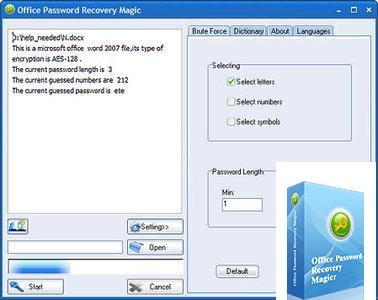
Step 1: Click "Open" button to open rar archive.
Step 2: Click "Setting" button to set desired parameters.
A - The set of characters available in the password. (letters only, numbers only,
symbol only, letters and numbers...)
B - Select the password length (range) in "BruteForce" panel.
Step 3: Press the "Start" button to start recovery.
破解說明:
Name: BEAN
Serial: RPRM2699978
軟體簡介:
RAR Password Recovery Magic 6.1.1.320《專門破解RAR壓縮檔》多國語言破解版
RAR Password Recovery Magic是一款專門用於破解RAR壓縮包已加密的密碼破譯工具,
同時可以完美的提供對自選Dict字典的支援。
Features:
* Recover passwords for RAR/WinRAR archives.
* Custom character set for "brute-force" attack supported.
* You can select character from a range of character options including: Letters,
Numbers, symbol...
* Large wordlist dictionary.
* Work in the background.
* Features a user-friendly interface.
How to Use
RAR Password Recovery Magic is very easy to use. To recover a password, all you
need to do is just to add your file to the operation window.
Step 1: Click "Open" button to open rar archive.
Step 2: Click "Setting" button to set desired parameters.
A - The set of characters available in the password. (letters only, numbers only,
symbol only, letters and numbers...)
B - Select the password length (range) in "BruteForce" panel.
Step 3: Press the "Start" button to start recovery.