
會員登錄

軟體搜尋

您的位置: 網站首頁 >> 程式軟體光碟 >> 系統工具 >> 商品詳情
商品詳情
|
商品編號:CB8408 碟片數量:1片 銷售價格:200 瀏覽次數:8142 

【轉載TXT文檔】 |
您可能也喜歡:
CB43309--RS RAID Retrieve 2.9 (RAID資料恢復軟體) 英文破解版
CB43312--SweetScape 010 Editor 16.0.4 x64 x86 十六進位檔編輯軟體 英文破解版
CB43317--Total Commander 11.57 Beta 3 x64 x86 著名的文件管理軟體 英文破解版
CB43321--VovSoft Sticky Notes 10.3 電腦桌面的便簽軟體 英文破解版
CB43327--4DDiG Partition Manager v3.10.1.11 x64 一體化的磁碟分割區管理軟體 多國語言含繁體中文破解版
商品描述
Nissoft DupDupDel v1.2.1 英文正式版(重複檔搜索和刪除工具)
![]()
軟體簡介:
Nissoft DupDupDel v1.2.1 英文正式版(重複檔搜索和刪除工具)
DupDupDel是一款重複檔搜索和刪除工具,能夠為你清理出更多的存儲空間。
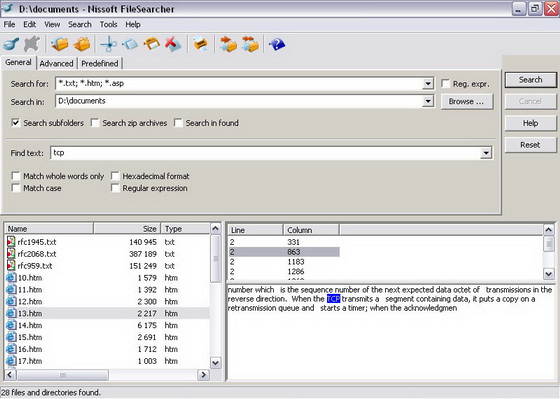
FileSearcher is a desktop application that provides full text search capability using
a host of different file types. Supported file types include Plain Text (txt), Rich Text
Format (rtf), Web pages (HTML), Microsoft? Word (doc), Adobe? PDF (pdf) and more.
The most innovative feature of this program is that you can view a brief snapshot of
any information found while searching. This enables you to preview your search results
while you are looking without having to wait until the search has finished. It is possible
to stop the search at any moment if you have found the file you are looking for.
Exact search results are provided with both simplified and power search settings. These
settings can be easily specified within FileSearcher.
FileSearcher allows you to search for files:
By filename mask (also with regular expressions)
In subdirectories
In archives (ie zip)
More exact search in found
By date (created/modified/accessed), size (greater/less/equal) and attributes (read only/hidden/system/directory etc)
Full text (also with regular expressions)
And more ...
軟體簡介:
Nissoft DupDupDel v1.2.1 英文正式版(重複檔搜索和刪除工具)
DupDupDel是一款重複檔搜索和刪除工具,能夠為你清理出更多的存儲空間。
FileSearcher is a desktop application that provides full text search capability using
a host of different file types. Supported file types include Plain Text (txt), Rich Text
Format (rtf), Web pages (HTML), Microsoft? Word (doc), Adobe? PDF (pdf) and more.
The most innovative feature of this program is that you can view a brief snapshot of
any information found while searching. This enables you to preview your search results
while you are looking without having to wait until the search has finished. It is possible
to stop the search at any moment if you have found the file you are looking for.
Exact search results are provided with both simplified and power search settings. These
settings can be easily specified within FileSearcher.
FileSearcher allows you to search for files:
By filename mask (also with regular expressions)
In subdirectories
In archives (ie zip)
More exact search in found
By date (created/modified/accessed), size (greater/less/equal) and attributes (read only/hidden/system/directory etc)
Full text (also with regular expressions)
And more ...