
會員登錄

軟體搜尋

您的位置: 網站首頁 >> 專業繪圖 >> 3D動畫CADCAMCAE >> 商品詳情
商品詳情
|
商品編號:CID5325 碟片數量:1片 銷售價格:80 瀏覽次數:10354 

【轉載TXT文檔】 |
您可能也喜歡:
DVD31655--Proteus Design Suite 9.1 SP2 (EDA仿真軟體) 英文破解版(DVD一片裝)
DVDP5051--MSC Adams Modeler 2025.1 x64 新一代的動力學建模軟體 英文破解版(DVD9一片裝 此片售價200元)
DVDP5057--SolidCAM 2025 SP4 HF1 for Solid Edge 2020-2026 x64 領先的集成CAM軟體 英文破解版(DVD9一片裝 此片售價200元)
CID13111--Ashampoo Photo Converter 3.0.2 x64 圖片批量轉換軟體 英文破解版
CID13116--Bondware Poser Pro 14.0.224 三維人體動畫製作軟體 英文破解版
商品描述
Inpaint v2.4 圖片去浮水印工具 英文破解版
![]()
![]()
破解說明:安裝完成後,請將光碟 \crack 目錄下的檔案,複製到主程式的
安裝目錄內中,並覆蓋,即可破解!
軟體簡介:
Inpaint v2.4 圖片去浮水印工具 英文破解版
軟體介紹:
Inpaint可以從您的圖片中刪除不想要的部分,如額外的線、人物、文字等......選定後
Inpaint會自動進行擦除,同時Inpaint會根據附近圖片區域重建擦除的區域,使看起來
完美無暇,沒有痕跡。當然也跟你選擇區域的精細程度也有關係,越精細,效果也就自
然越好。
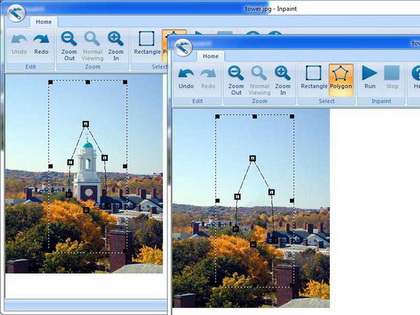
Take a look at how the picture is improved when the building is removed.
You can remove the unwanted object or person using Inpaint.
Inpaint reconstructs the selected image area from the pixel near the area boundary.
Inpaint may be used to remove undesirable objects from still images.
Delete any unwanted object from your photo, such as logo, watermark, extra power-line,
people, text... The program will automatically inpaint the selected area to erase it.
If some unexpected object spoils an otherwise good photograph, Inpaint may be used to
remove it. Simply select the object. No need for fiddly messing about with the clone tool!
It is alarmingly simple to use. Draw a selection around the object you wish to remove
from the picture, and run smart remove selection. Inpaint will fill the selection area
with intelligently generated texture drawn from the surrounding image data. really magic
function you should try it!
Inpaint is called "the most promising in its class" by 3d2f.com editors.

破解說明:安裝完成後,請將光碟 \crack 目錄下的檔案,複製到主程式的
安裝目錄內中,並覆蓋,即可破解!
軟體簡介:
Inpaint v2.4 圖片去浮水印工具 英文破解版
軟體介紹:
Inpaint可以從您的圖片中刪除不想要的部分,如額外的線、人物、文字等......選定後
Inpaint會自動進行擦除,同時Inpaint會根據附近圖片區域重建擦除的區域,使看起來
完美無暇,沒有痕跡。當然也跟你選擇區域的精細程度也有關係,越精細,效果也就自
然越好。
Take a look at how the picture is improved when the building is removed.
You can remove the unwanted object or person using Inpaint.
Inpaint reconstructs the selected image area from the pixel near the area boundary.
Inpaint may be used to remove undesirable objects from still images.
Delete any unwanted object from your photo, such as logo, watermark, extra power-line,
people, text... The program will automatically inpaint the selected area to erase it.
If some unexpected object spoils an otherwise good photograph, Inpaint may be used to
remove it. Simply select the object. No need for fiddly messing about with the clone tool!
It is alarmingly simple to use. Draw a selection around the object you wish to remove
from the picture, and run smart remove selection. Inpaint will fill the selection area
with intelligently generated texture drawn from the surrounding image data. really magic
function you should try it!
Inpaint is called "the most promising in its class" by 3d2f.com editors.